Remote Video Astronomy
Practical solutions to questions when using video assisted Astronomy remotely
  • Home
  • RVA
  • Start Simple
  • Learn More
  • Expand
  • Downloads
  • Blog

If a picture is worth a thousand words ...

11/25/2014

0 Comments

 
Picture
Then what is a live image worth? A lot more! It's not just the image though. It is seeing the live image, the experience of slewing your telescope to a point in the sky you just chose, seeing star trails on the screen until the telescope starts tracking that precise area of the sky, and seeing your target object appear on the screen. Then you fine tune your settings, maybe increase the exposure time a few more seconds, and you see your selected object better than you ever saw it through your eyepiece.

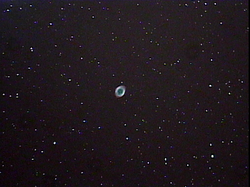
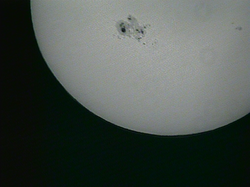
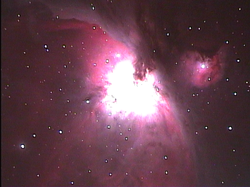
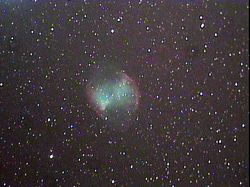
I admit you sometimes can't help but click the capture image button for a permanent memory of what you are seeing live.  Maybe you want something to show so you can tell somebody about it later. But a recorded picture is not the essence of video astronomy. It is the experience itself that is important. And others can experience it right there with you in real time. If you do capture some images, they will probably not be "as good" as astrophotography pictures, but they are still pretty amazing. All camera "pictures" on this site are real time captures of the image being viewed at the time.

Astrophotography is certainly its own worthy pursuit that produces a high resolution picture with even better detail and color. But it's a different process and experience. You will typically spend more time capturing images of just a few targets in one evening. Then you invest more of your time after you put up your telescope to work with your captured images using post processing techniques, and produce the best picture you can get.  For DSO astrophotography, you will typically need very good tracking and maybe even use autoguiding. The efforts you put into astrophotography can be very rewarding, but it’s different from Video Astronomy.  With Video Astronomy you capture the moment.

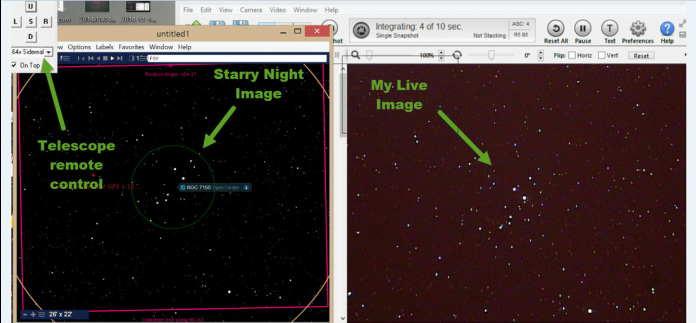
Extending Video Astronomy inside through RVA techniques provides yet another unique type of experience. Being an engineer and programmer I have always been intrigued with robotics and computer remote control.  Having planetarium software enabling you to slew to your target and then compare the expected image to what you see live on your screen is really great.


It's nice to be inside, pick out an object on your laptop's screen, and then click to initiate your telescope moving to that specific point in the sky from your current spot on Earth, watch the display showing the camera's image as stars stream by, and it slows and settles in on your target. Then after a few adjustments you tell someone nearby ... take a look at this!  And you both look at it together at the same time.
Picture


Later on you tell someone, I gotta show you an image of what we saw that night.

Picture


And this.


Picture


And this.


Picture

And the other day I was checking out some sunspots (while inside where I can see a lot better) and saw this...


And last night I saw...

And you talk about what you experienced that night.
0 Comments

A good beginner telescope and mount for RVA

11/17/2014

0 Comments

 
Picture
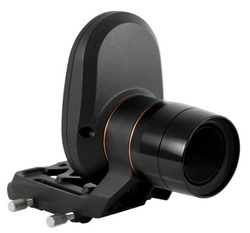
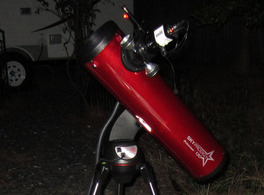
My use of the Celestron StarSense Accessory got me thinking about the SkyProdigy 130 for a light weight portable scope with auto align capability for RVA.  The alignment camera is integrated into the SkyProdigy mount instead of attached to the scope (like is done with the SSA), so it also makes it easy to use with different scopes. Initially, I saw posts indicating you cannot connect to the SkyProdigy hand controller serial port to control it from your phone or laptop, which would rule out RVA use, and that it did not use the same camera as the SSA. Then I found out all new SkyProdigy telescopes would start shipping using the same internal camera and hand controller as the SSA. If the SkyProdigy hand controller uses version 1.06 or higher, it is the newer model.

So I ordered one, but received a SkyProdigy from a vender’s stock that was not one of the new ones (The hand controller version and build date were old). They accepted a full return with no problems. I then ordered a SkyProdigy 130 from a vendor who was out of stock, which guaranteed I would get a new one from Celestron. I received it and verified the version and found it is the same hand controller and internal camera as the StarSense accessory. I even tried using my SSA hand controller on the SkyProdigy and it worked just fine.


So I set up the SkyProdigy outside and found it was just what I was looking for as a portable auto align scope for RVA! Its hand controller works fine wirelessly with SkyFi and SkySafari on my phone. It also works with Starry Night using serial to USB to my laptop inside. I did perform a camera calibration which slightly improved the pointing accuracy (even though it came pre-calibrated).  I found I could use my Mallincam Micro camera without a focal reducer and get good results since the 130mm is a F5 scope, providing a nice field of view and shorter exposure time (I have to use a focal reducer on my C8 to convert from F10 to F5 for better RVA use).

If you are thinking of buying a new telescope and mount to use for Remote Video Astronomy, I recommend beginning with the SkyProdigy 130 for the following reasons:

1. It is lightweight and easy to set up
2. The 130 is a fast (F5) 5.1” scope suitable for Video Astronomy
3. The F5 scope provides a good field of view with the Mallincam Micro without having to use a focal reducer
4. It has auto align functionality built in, which really simplifies and reduces RVA setup time
5. It can be computer controlled remotely
6. Its Newtonian open design adapts quickly to the outside temperature
7. The alignment camera is built into the mount (not on the scope)


The SkyProdigy is an entry level Alt-Az mount, so you do have to be patient for a few seconds after slewing to an object while its tracking overcomes any backlash, thus eliminating star trails.  Due to the length of the 130 scope, your maximum altitude slew limit is 70 degrees.  But that is a similar limitation with my SE Alt-Az mount.  I have a Celestron C5 that weighs about the same as the 130.  I found I can use my C5 on the SkyProdigy mount with no slew limitations.  It can point straight up even with a video camera in place!  So if you decide to spend more and get the SkyProdigy 6, it should likewise not have any slewing limits (You will want to use a focal reducer with it though).

A couple more suggestions.  The SkyProdigy always tries to slew to the same three points for its alignments if there are no obstructions, so learn which direction is best to point your SkyProdigy when starting an auto align. Using a rechargeable PowerTank (or similar) battery with a long power cord eliminates the need to purchase batteries, and the longer power cord really helps.

0 Comments

 The benefits of auto align functionality for RVA

11/16/2014

0 Comments

 
Picture
I have been very pleased using Celestron’s StarSense Accessory (SSA) on both my CG-5 and SE mounts. It really makes alignment quick and easy without having to sometimes put your body in weird positions trying to see that pesky star you want to add to your alignment.  It also completely eliminates the need to use an eyepiece to perform the alignment and then replace your eyepiece with your video camera, and refocus … while making sure you don’t disturb your good alignment.  Of course you can perform an alignment with your standard hand controller using a video camera, as long as your finder scope is positioned well itself so that when a star is centered in your finder scope, the star will also be in the field of view of your video camera ... and if your video camera is already fairly close to focus. If you use the StarSense Accessory, you do not even need a finder scope for an alignment.  In fact you do not even have to have your video camera in focus yet, or for that matter the video camera does not even have to be turned on. I turn on my mount and start the auto align process with my video camera already in place, but don’t bother with the focus until the alignment is complete.  Then I slew to a bright star, put a focus mask over the end of my scope, make sure my camera is in good focus, remove the mask and am ready to begin viewing.

With auto align, if I change out any of my optics before beginning my viewing session (focal reducers, barlow, video camera, etc), I can wait until the system is aligned and tracking before focusing the new setup.  This is especially helpful when using an Alt-Az mount since it does not begin tracking until the mount is aligned.

I have added a JMI remote focus control to my C8, which when used with the SSA allows me to get everything in place both outside and inside before I turn anything on.  I then power everything on at the telescope, start the auto align process, go inside and power on my laptop and start up my video monitoring and control software.  When the auto align is complete, I slew to a bright star and check my focus and am ready to begin.


0 Comments

    Author

    Astronomy was my favorite hobby many years ago, but was gradually set aside due to work, family and life in general.  In recent years I resumed my hobby looking forward to using the new technology that is now available.  Then I discovered Video Astronomy.  Then I learned how to do it Remotely.  I wrote some books, and decided to set up this web site to continue to pass on what I learn.

    ​Jim Meadows

    Questions or comments?  Email me at:
    ​[email protected]

    NOTE: If you use Microsoft Edge and clicking on an Archives or Categories link below does not work, please try an alternate browser (e.g. Chrome).

    Archives

    March 2026
    November 2025
    September 2025
    August 2025
    February 2025
    December 2024
    August 2024
    April 2024
    February 2024
    October 2023
    June 2023
    September 2022
    May 2022
    May 2021
    December 2020
    October 2020
    May 2020
    March 2020
    February 2020
    July 2019
    June 2019
    May 2019
    January 2019
    December 2018
    November 2018
    October 2018
    April 2018
    March 2018
    November 2017
    October 2017
    September 2017
    August 2017
    June 2017
    April 2017
    March 2017
    January 2017
    December 2016
    October 2016
    August 2016
    July 2016
    May 2016
    April 2016
    March 2016
    February 2016
    January 2016
    December 2015
    September 2015
    August 2015
    June 2015
    April 2015
    March 2015
    January 2015
    December 2014
    November 2014

    Categories

    All
    Accessories
    AGc / AGm
    Articles By Others
    Astrophotography
    Auto Align
    Auto Center
    Auto-center
    Build
    Commentary
    DS10c
    DS2.3+
    DS26cTEC
    DS8300cTEC
    Eclipse
    Focal Reduction
    Hyperstar
    LHDR
    LPP
    Mallincam Micro
    MallinCam Netbook Kit
    MallinCamSky
    MallinCam X2 / XT
    MallinCam Xterminator
    Miloslick
    Mmec Software
    Permanent
    Pier
    Portable
    Pro Dob 2
    RASA
    RVA
    SharpCap
    SkyBT
    SkyFi
    SkySafari
    SkyShed
    Software
    Solar Viewing
    Star Parties
    StarSense AutoGuider
    Starter Telescope
    Stellarium
    Video Astronomy

    RSS Feed

Web Hosting by Domain.com